

An honest guide for busy moms starting a business.
It's 11pm. The kids are finally asleep, and you have six tabs open: Squarespace, Wix, Shopify, a Kajabi sales page someone mentioned in a Facebook group, and two "best website builder" lists that recommend completely different things. You've been comparing features for an hour, and you're no closer to a decision than when you started.
If that sounds familiar, please know you are not bad at this. Choosing a website builder feels high-stakes because nobody explains how the decision works. Most comparison articles list features. Very few help you figure out which features matter for your business.
After 15+ years in design, I can tell you the right builder rarely comes down to which one is "best." It comes down to two simple things: what you sell, and how you get paid. Once you know those, most of the options take themselves off the table.
This guide walks you through that decision, step by step. Bookmark it. You'll likely want it again as your business grows.
Please Note: Prices and plan details were checked in September 2026 and change often. Always confirm on the platform's own pricing page.
A quick, honest note before we start.
You probably know I build on Squarespace. I use it for my own business, and I build client sites on it. I also don't have affiliate links to any platform in this post, so I don't earn anything no matter which one you choose.
That means I can be straight with you. Squarespace is the right starting point for many of the women I work with, but not all of them. Below, I'll tell you exactly when it is and when it isn't the right fit, including the price increases it's had over the last couple of years. The goal is for you to pick the builder that fits your business, not the one that fits mine.

Start here: three questions to answer before you compare anything.
Before you open another pricing page, grab a notebook and answer these three questions.
1. What will you sell in the next 12 months?
I mean what you'll really sell, not the dream version. This could be your time (coaching sessions, services), physical products, digital products (templates, downloads), or programs (courses, memberships, group coaching). Most businesses lean heavily toward one of these.
2. How will people pay you?
Will clients book and pay for a session up front? Buy a product at checkout? Pay a monthly membership? Or will they fill out an inquiry form and get an invoice from you later? How you get paid is where the hidden costs live, so this answer matters more than any design feature.
3. How much time and tech patience do you have?
If you're building in school-hour pockets and nap times, an easy platform that does 90% of what you need beats a powerful one you can't figure out. Be honest with yourself here. There's no wrong answer, only a mismatched one.
Once you have these answers, the rest of this guide will make a lot more sense.
Match your business to a builder.
Here's a quick way to see where you're likely to land. I've focused on five builders that cover the most common small businesses: Squarespace, Wix, Shopify, Kajabi, and Webflow. Treat it as a starting point, since your plan needs and the tools you already use can change the answer.
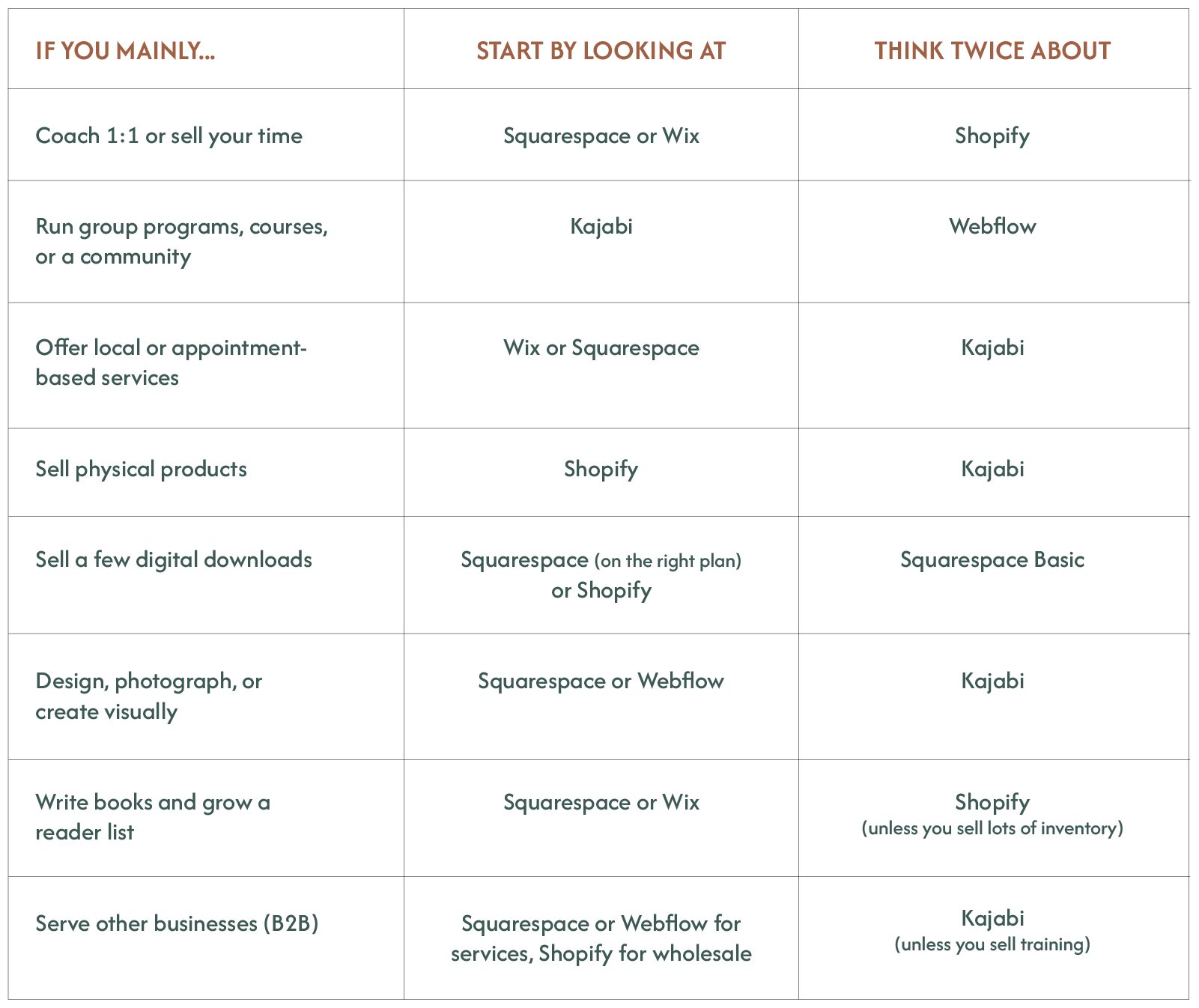
Now let's look at why.
The best website builder for coaches who sell their time.
You need a beautiful site that builds trust, a way for people to book with you, and simple payments. Squarespace or Wix handles this well without making you learn a complicated system.
On Squarespace, scheduling runs through Acuity, a separate subscription that starts at $16 a month billed annually[1] ($20 billed monthly). Wix includes bookings on its Core plan and above.[17] On annual billing, Squarespace Core[11] ($29) plus Acuity's starter plan ($16) comes to about $45 a month, before card processing and any extras.
The honest caveat: if your business is heading toward group programs, courses, and a community, Kajabi is built for that model. More on that below.
The best website builder for programs, courses, or a membership.
This is where Kajabi shines. It's an all-in-one platform, which means your website, email, courses, community, and checkout all live in one place, and Kajabi doesn't take a cut of your sales.[5]
The trade-off is price. Kajabi starts at $143 a month billed annually[5] ($179 billed monthly), and it raised its prices in January 2026,[6] which Kajabi says was its first price change in 10 years. That makes sense once you have an audience and a program that's selling. It can feel heavy before you've made your first sale.
If you're just starting out, it's perfectly fine to begin with a simpler site and move to a program platform once your offer is proven. Plenty of successful creators did exactly that.
The best website builder for service-based businesses.
Think bookkeepers, virtual assistants, photographers, wedding planners, cleaners, and consultants. Your website has one main job: help the right person understand what you do, trust you, and reach out.
When I built the site for Lucid Bookkeeping, a firm that serves coaches, designers, and other service-based businesses, the site needed to explain the services clearly, show transparent pricing, and help visitors find the right plan. It didn't need a complex store. It needed clarity. For most service businesses, Squarespace or Wix covers that beautifully.
When I built the site for The United Quilt Guild, a nonprofit membership serving roughly 50, primarily non-techy women, the site needed a simple membership area to house important information and an easy-to-use back end that a volunteer could manage. It didn't need a complex payment structure or paywalled course material. For their streamlined login-based needs, Squarespace was a great fit.
The best website builder for selling physical products.
Shopify. It's built for this.
Shopify's Basic plan starts at $29 a month billed annually[10] ($39 billed monthly) and includes the tools product sellers need: shipping labels, discounted postage, inventory tracking, and in-person selling. Card processing rates also go down as you move up plans.
Squarespace and Wix can absolutely run a small, beautiful shop with a handful of products, but if your catalog is growing or shipping is a big part of your day, Shopify will save you time and headaches.

The best website builder for selling digital products
Downloads, templates, printables, and guides can work on several platforms, but this is where fees matter most. On Squarespace, courses and memberships count as digital content, which carries its own transaction fee (7% on Basic, 5% on Core, 1% on Plus, and 0% on Advanced),[11] on top of card processing. Simple downloads are sold through the regular store,[2] which has a 2% fee on Basic and none on the higher plans.
If digital products are your main income, do the fee math before you choose a plan. I'll show you exactly how below.
The best website builder for designers or creatives
If you’re a creative, you care about how things look, and you should have a builder that lets your work shine. Squarespace gives you strong design control without writing code, which is exactly why I use it myself.
Webflow offers even more control and is loved by designers and agencies alike. It also has a steeper learning curve, and it doesn't include booking or email marketing, so you'd add those separately. If you enjoy the technical side, it's a great tool. If you just want your portfolio live, it's probably more than you’ll need.
The best website builder for B2B or serving other businesses
For consultants, agencies, and professional services, Squarespace works well for most small firms and includes invoicing at no extra cost on every plan.[11] Webflow earns its place once you're publishing a lot of content or working with a marketing team. If you sell products wholesale to shops, Shopify's plans include wholesale (B2B) catalogs:[10] up to 3 on its standard plans and unlimited on Plus.
The five builders, honestly.
Here's my short take on each one, based on the needs above. Prices are in US Dollars on annual billing unless I say otherwise, checked in fall 2026. They change often, so always check the current pricing page before you sign up.
Squarespace: Best for coaches, service providers, creatives, and authors who want a polished, low-maintenance site with business tools in one place. Not ideal for large product catalogs or for heavy digital sales on the Basic plan. Plans currently run $19 to $99 a month on annual billing[11] for new customers, after a round of price increases in July 2026 (more on that below).
Wix: Best for local and appointment-based businesses that want lots of built-in tools, like bookings and events. Not ideal for large stores. Paid plans run about $17 to $159 a month.[18] If you plan to sell memberships or subscriptions, Wix charges its own transaction fee on Pricing Plans sales,[19] separate from card processing and tiered by plan, so check the plan comparison carefully.
Shopify: Best for physical products and wholesale. Not ideal for coaches, course creators, or service businesses, because courses, memberships, and bookings all depend on add-on apps. Plans start at $29 a month on annual billing.[10]
Kajabi: Best for courses, memberships, communities, and group coaching once you have an audience. Not ideal for product sellers or budget-conscious service businesses. Plans start at $143 a month on annual billing.[5]
Webflow: Best for designers, agencies, and B2B companies that need custom design and a lot of content. Not ideal for non-technical solo business owners or small shops. Site plans start at $15 a month on annual billing,[14] but e-commerce, team workspaces, and add-ons are billed separately and can raise your total.

Why I build on Squarespace.
Since I'm asking you to be honest about your needs, I'll be honest about mine.
For me, design is important. I want as much control as possible over how my site looks, without the complication of coding something custom. Squarespace gives me that balance.
For my clients, it comes down to ease of use mixed with real features. In my experience, Squarespace has the best mix of the tools a small business needs, like email campaigns, memberships, and invoicing, all in one place. That means fewer logins, fewer subscriptions, and fewer things to break when life gets busy.
I'll also be honest that the price increases haven't been an easy pill to swallow, for me or for my clients. Squarespace costs more today than it did when many of us started using the platform. For the kind of business most of my clients are building, I still think it earns its price, because it replaces several separate tools and saves hours of your limited time. That's a judgment you get to make for yourself, though, and I'd rather you make it having the full picture.
The blind spots most people miss.
These are the things that rarely make it into comparison charts but make a real difference to your wallet and your sanity.
Transaction fees are the hidden price tag
The monthly price is only part of what you pay. Many platforms also take a percentage of every sale, on top of normal card processing.
Here's a real example. Say you sell $2,000 a month in courses or memberships on Squarespace's Basic plan. The 7% digital content fee is $140 a month, plus the $19 plan, so about $159 a month goes to Squarespace. The Advanced plan is $99 a month on annual billing[11] and charges 0% on digital content, so for that business, the "expensive" plan saves about $60 a month. Card processing applies on both plans, and these numbers use new-customer annual pricing, so run them with your own plan and billing.
Try this: take your realistic monthly sales goal, multiply it by each platform's fee, and add the monthly price. That's your true cost.
Add-ons add up
Scheduling, email marketing, extra storage, and premium apps are often separate subscriptions. A $29 plan can quietly become a $75 plan. Before you commit, list every tool you'll need and check whether each one is included or extra.
Prices change, including on the platform I use
I'd be doing you a disservice if I skipped this one, especially since it involves my platform of choice.
Squarespace has raised its prices more than once in the last few years. In early 2025, it replaced its old Personal, Business, and Commerce plans[2] with four new ones: Basic, Core, Plus, and Advanced, and the top tiers cost noticeably more. The old Commerce Advanced plan was about $52 a month billed annually, and its replacement, Advanced, is $99.
Then, in July 2026, Squarespace emailed customers about another increase[8] rather than making a public announcement. On annual billing, Basic went from $16 to $19 a month, Core from $23 to $29, and Plus from $39 to $49,[4] while Advanced stayed at $99. About a week later, Squarespace sent some customers a correction,[3] saying an internal error had misapplied prices on certain plans and lowering their renewal price. No one was charged the wrong amount, but it means your renewal price may not match the first email you got, or what new customers pay. Today, the Squarespace pricing page[11] lists $19, $29, $49, and $99 a month on annual billing for new sign-ups.
The reaction to the July increase was loud, especially from photographers and creatives. One longtime user posted on Reddit[9] that their annual cost had climbed from $216 to $348 since 2021, about 61%, and that they felt the biggest thing they were now paying for was AI that they never asked for. That's one person's bill, as reported by TechRadar,[13] not an average. When TechRadar asked Squarespace about the increases, a representative said the company had recently added features to every plan that used to be limited to higher tiers or outside services, and that it keeps investing in the platform.
It's not only Squarespace. Kajabi raised its prices in January 2026,[6] Webflow changed its pricing in May 2026,[15] and Wix charges a separate fee on memberships and subscriptions[19] that depends on your plan.
So what do you do with this? Please don't let it scare you off. Let it guide how you plan. Pick a platform that fits your business at today's prices, budget for prices going up over time, and check your renewal date so the new price is never a surprise. As the July Squarespace increase showed, existing subscribers can see new pricing when they renew, so the amount you pay in year one probably won't be the amount you pay in year three.
Leaving is harder than arriving
Getting started on a builder is fairly easy. Leaving can be much harder, and exactly how hard depends on the platform and what you're moving. Squarespace says many parts of a site won't export[12] because they rely on their own code. Kajabi doesn't let you export blog posts directly.[7] And Webflow's code export leaves out CMS content, e-commerce, and member accounts,[16] which you can save only as spreadsheets.
This isn't a reason to panic. It's a reason to protect the things that matter most. Your email list is the most valuable asset in your business, so make sure you can export it and download a copy every few months.
Your time has a cost too
Remember, a lower-cost builder that takes you three extra weeks to figure out isn't really saving you anything. When your time comes in small pockets, ease of use is a feature worth paying for.
The mistakes I see most often.
In 15+ years of design work, these are the three builder mistakes I see again and again.
1. Picking the newest trend.
A new platform launches, everyone is talking about it, and it feels like the smart, modern choice. New isn't the same as right. Newer tools can change quickly, and they often have fewer tutorials and less help when you get stuck.
2. Picking what someone you follow uses.
It's so tempting. She has a gorgeous site and a thriving business, so her platform must be the answer. However, her business isn't your business. She might sell courses while you sell services, or she might have a team while you have naptime. Borrow her inspiration, not her tech stack.
3. Picking something that doesn't match your needs.
This is the big one. People choose based on features that sound impressive instead of what their business needs today. The result is either a platform that can't do what they need or one so complicated they never finish launching it.
A few more worth watching for:
Paying for the business you hope to have in three years. Start on the plan you need now. Every platform on this list lets you upgrade when you're ready.
Choosing on monthly price alone. As you saw above, fees can make an inexpensive plan a costly one.
Staying in research mode forever. Comparing builders can feel like progress, but it isn't building. Don't waste time paralyzed by making a decision. At the end of the day, you can always change plans and providers.
Tips to get started quickly and cost-effectively.
Give the decision a deadline. Use your three answers from the start of this post, narrow it to two builders, and decide within a week. This isn't a forever decision, and a good choice made now beats a perfect one made next year.
Test with a real task, not a tour. During the free trial, don't just browse templates. Try to build your homepage and set up one product or booking. You'll learn more in an hour spent doing than in a week spent reading reviews.
Do the fee math. Write down your realistic monthly sales and calculate your true cost on each builder you're considering.
Start simple. In my experience, most new businesses can launch with five pages or fewer: Home, About, your offer, Contact, and maybe a blog or portfolio. You can add more once people are finding you.
Own your audience from day one. Collect email addresses early, and export your list regularly, no matter which platform you use.
Set a "done" line. Decide what "ready to launch" means before you start, so perfectionism doesn't quietly move the finish line. Progress over perfection, always.

Your quick decision checklist.
Come back to this list whenever you're weighing a builder:
I know what I'll sell in the next 12 months.
I know how people will pay me.
I've checked the transaction fees for my main type of sale.
I've listed every add-on I'll need and what it costs.
I know my renewal date and have budgeted for the price going up.
I've tried a real task during the free trial period.
I can export my email list and my key content.
I chose this because it fits my business, not because it's trendy or because someone else uses it.
You don't need the perfect builder, you need the right fit.
The best website builder isn't the one with the longest feature list. It's the one that fits what you sell, how you get paid, and the real, busy life you're building around. Choose that one, set a done line, and start. You can always adjust later.
If your biggest challenge isn't the tech but finding the time to build at all, start with The Stolen Moments Guide. It's a $19 workbook that helps you find and protect the small pockets of time you already have, so your business finally gets some of them. And if you'd love guidance building your Squarespace site alongside other women doing the same, keep an eye out for The Confident Creators Studio, opening in early 2027.
You've built a beautiful life for everyone else. Now it's time to build something that's yours.
Sources
Prices and plan details were checked in September 2026 and change often. Always confirm on the platform's own pricing page.
Acuity Scheduling. "Pricing Plans & Features." Accessed September 2026. https://acuityscheduling.com/signup.php
Applet Studio. "Squarespace Pricing Explained: 2025 Update." 2025. https://www.applet.studio/blog/squarespace-pricing-explained
DIYPhotography. "Squarespace Now Says Its Price Increase Was 'An Error', Reduces Prices for Some Photographers." July 24, 2026. https://www.diyphotography.net/squarespace-now-says-its-price-increase-was-an-error/
DIYPhotography. "Squarespace Is Raising Prices Up to 26 Percent: Here's What It Means for You." July 2026. https://www.diyphotography.net/squarespace-price-increase-26-percent-2026/
Kajabi. "Pricing." Accessed September 2026. https://www.kajabi.com/pricing
Kajabi. "Upcoming Changes to Your Kajabi Plan (Q4 2025)." December 2025. https://www.kajabi.com/updates/2025-pricing-updates
Kajabi Help Center. "Back Up Site Content." Accessed September 2026. https://help.kajabi.com/articles/products/courses/back-up-your-site-content
PetaPixel. "Squarespace Is Increasing Prices By Up to 26%." July 17, 2026. https://petapixel.com/2026/07/17/squarespace-is-increasing-prices-by-up-to-26/
Reddit, r/squarespace. "Let's take a look at the price increase from 2021." July 2026. https://www.reddit.com/r/squarespace/comments/1uy2qbm/lets_take_a_look_at_the_price_increase_from_2021/
Shopify. "Pricing." Accessed October 2026. https://www.shopify.com/pricing
Squarespace. "Pricing Plans & Features." Accessed October 2026. https://www.squarespace.com/pricing
Squarespace Help Center. "Exporting Your Site." Accessed September 2026. https://support.squarespace.com/hc/en-us/articles/206566687-Exporting-your-site
Williams, Owain. "'I'm Paying for Things I Sincerely Did Not Ask For': Squarespace Users Aren't Happy with Recent Price Hikes." TechRadar. July 29, 2026. https://www.techradar.com/pro/im-paying-for-things-i-sincerely-did-not-ask-for-squarespace-users-arent-happy-with-recent-price-hikes
Webflow. "Plans & Pricing." Accessed September 2026. https://webflow.com/pricing
Webflow Blog. "We're Updating Our Pricing and Simplifying Our Plans at the Same Time." May 2026. https://webflow.com/blog/simplified-plans-and-updated-pricing-2026
Webflow Help Center. "How Do I Export My Webflow Site Code?" Accessed September 2026. https://help.webflow.com/hc/en-us/articles/33961386739347-How-do-I-export-my-Webflow-site-code
Wix. "Plans." Accessed September 2026. https://www.wix.com/plans
Bistricer, Rachel. "How Much Is a Wix Website?" Wix Blog. July 29, 2026. https://www.wix.com/blog/how-much-is-a-wix-website
Wix Help Center. "Pricing Plans: About the Transaction Fee." Accessed October 2026. https://support.wix.com/en/article/pricing-plans-about-the-transaction-fee